Short Answer
For a button-and-status HMI read from 400–700 mm, 800×480 is still correct and is the only one of these three specified for wide temperature. For a graphics-heavy machine interface with trends, lists and small labels, 1024×600 is the practical default. Choose 1280×800 only when the content genuinely needs 217 ppi — waveforms, dense tables, medical or test-and-measurement readouts — and accept that in the current 7-inch line it comes at 400 cd/m² rather than 1000, and at a narrower temperature range than the 800×480 part. Decide brightness and temperature first; resolution is the third question, not the first.
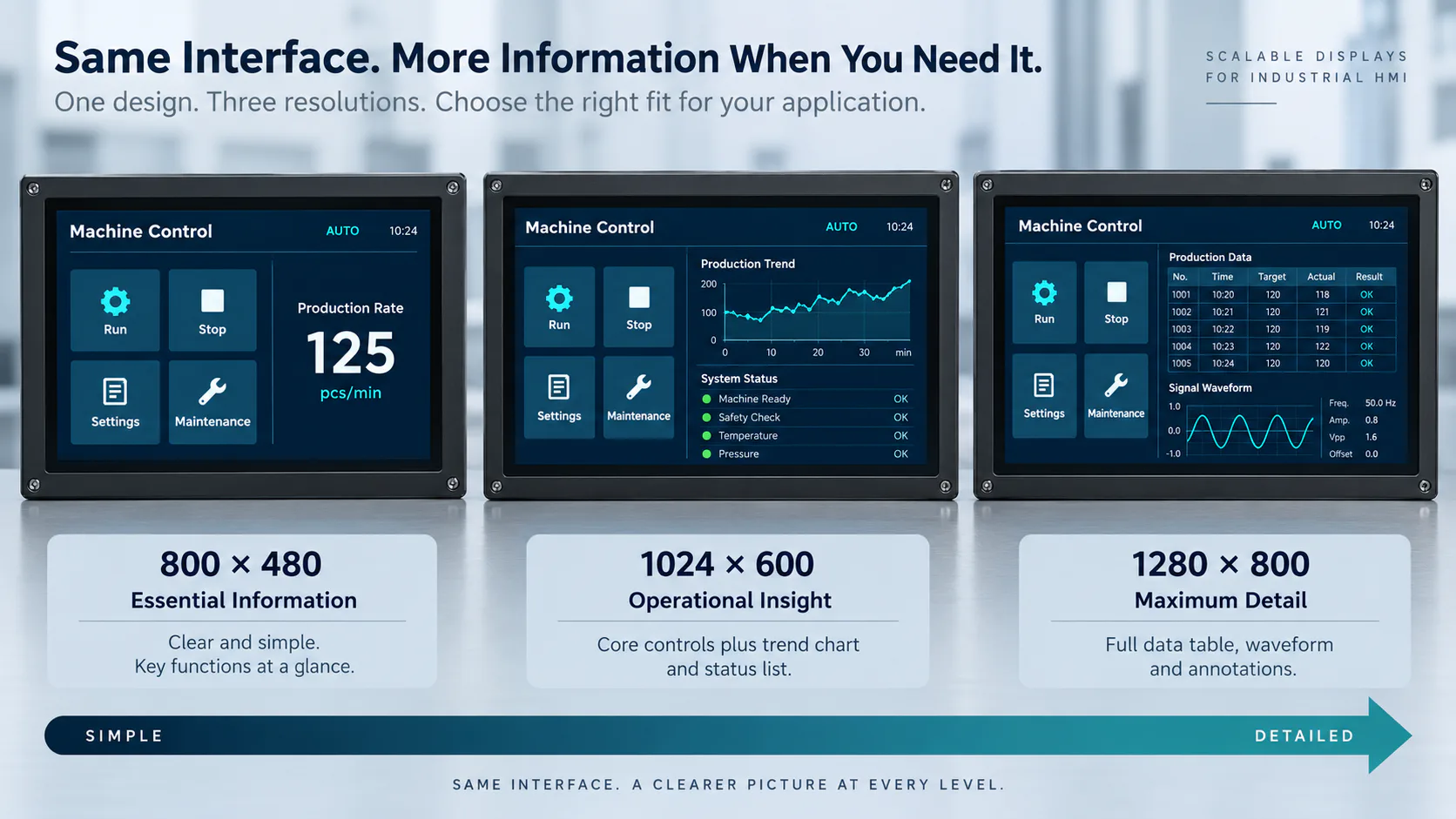
The Three Modules, Side by Side
Abstract resolution comparisons are easy to write and hard to use. The table below is built from the published data for the three 7-inch modules in our catalogue, so the trade-offs are the real ones rather than the theoretical ones.
| Item | DS-T070SWHWA-01 | DS-T070BAHA-02 | DS-T070TISA-01 |
|---|---|---|---|
| Resolution | 800×480 | 1024×600 | 1280×800 |
| Aspect ratio | 15:9 | ~16:9.4 | 16:10 |
| Panel type | IPS | IPS | IPS |
| Luminance | 1000 cd/m² | 1000 cd/m² | 400 cd/m² |
| Interface | LVDS 6/8-bit, 20-pin | LVDS 6/8-bit, 40-pin | LVDS 8-bit, 40-pin |
| LCD driver IC | HX8249-A01 + HX8678-C01 | HX8282A11 + HX8696A01 | ST5821C + ST5084C |
| Touch panel | No TP | No TP | No TP |
| Active area (W×H) | 152.40 × 91.44 mm | 154.21 × 85.92 mm | 149.76 × 93.60 mm |
| Module outline (W×H×D) | 169.80 × 109.70 × 8.90 mm | 164.80 × 99.80 × 5.65 mm | 161.00 × 107.00 × 3.35 mm |
| Operating temperature | −30 to 85 °C | −20 to 70 °C | −20 to 70 °C |
| Storage temperature | −35 to 85 °C | −30 to 80 °C | −30 to 80 °C |
Three things in that table matter more than the resolution column.
Only one of them is a wide-temperature part. DS-T070SWHWA-01 is specified −30 to 85 °C; the other two are −20 to 70 °C. If the equipment lives outdoors, on a vehicle or in an unheated plant room, the resolution decision has already been made for you. Why that matters at the cold end — liquid-crystal response time, start-up behaviour and LED forward-voltage headroom — is covered in the wide-temperature selection guide.
You cannot have 1280×800 and 1000 nits here. The high-resolution part is 400 cd/m². This is not an arbitrary product decision: a finer pixel grid spends more of the panel area on transistors and bus lines, so aperture ratio falls and more backlight power is needed for the same luminance. More backlight power is more heat, which brings the thermal and lifetime considerations described in the high-brightness thermal trade-offs guide.
The depths differ by 2.7×. 3.35 mm, 5.65 mm and 8.90 mm. On a shallow panel-mount HMI or a handheld instrument that is frequently the deciding number, and it runs opposite to resolution — the highest-resolution module here is also the thinnest, while the wide-temperature 1000-nit module is the thickest and has the largest outline.
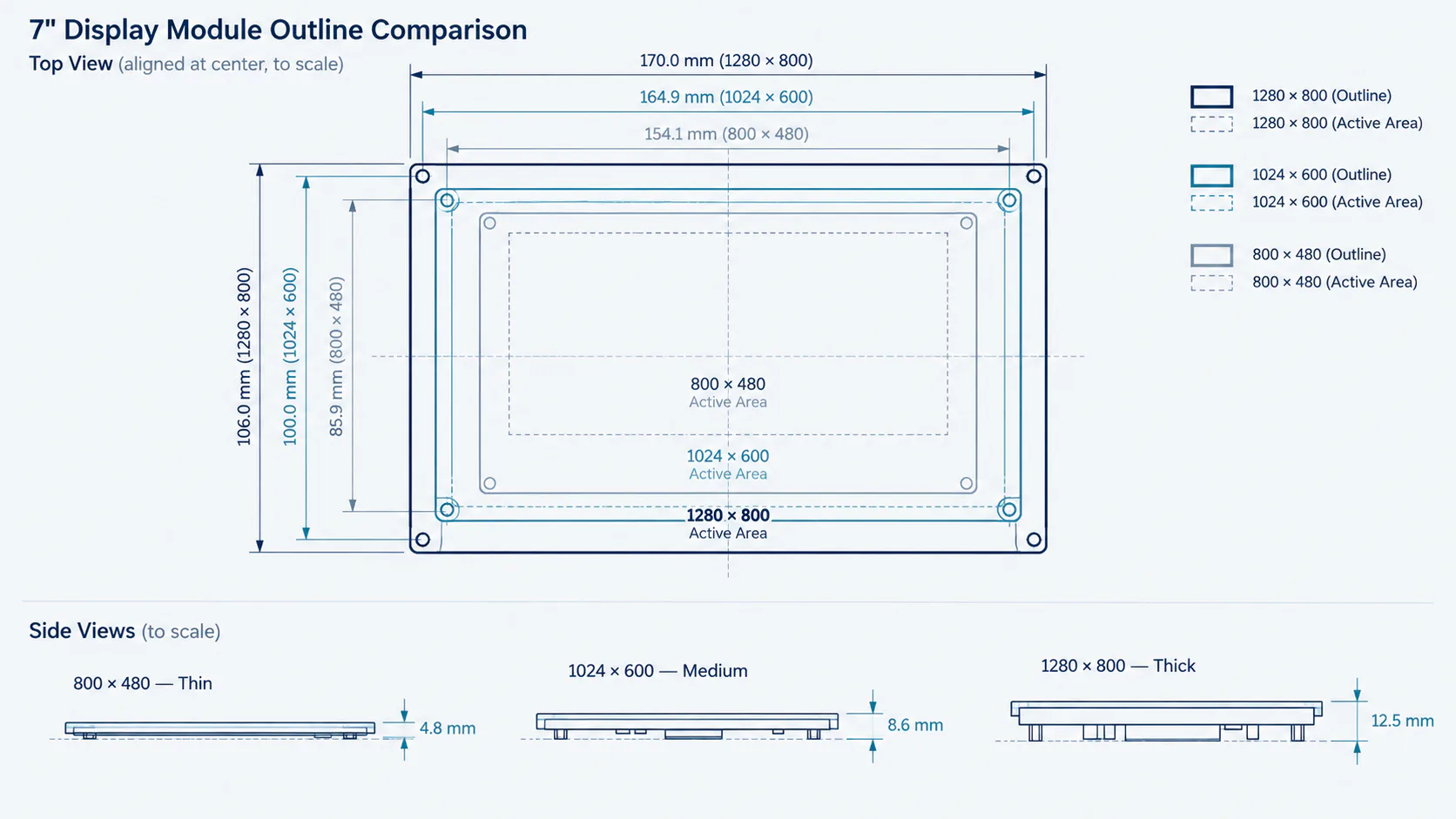
Pixel Pitch, PPI and the Non-Square Pixel
Divide the published active area by the pixel count and the picture becomes concrete.
| Resolution | Pixel pitch (H × V) | Density | Pixels | Active diagonal |
|---|---|---|---|---|
| 800×480 | 0.1905 × 0.1905 mm | ≈133 ppi, square | 384,000 | ≈177.8 mm (7.00″) |
| 1024×600 | 0.1506 × 0.1432 mm | ≈169 ppi H, ≈177 ppi V | 614,400 | ≈176.5 mm (6.95″) |
| 1280×800 | 0.1170 × 0.1170 mm | ≈217 ppi, square | 1,024,000 | ≈176.6 mm (6.95″) |
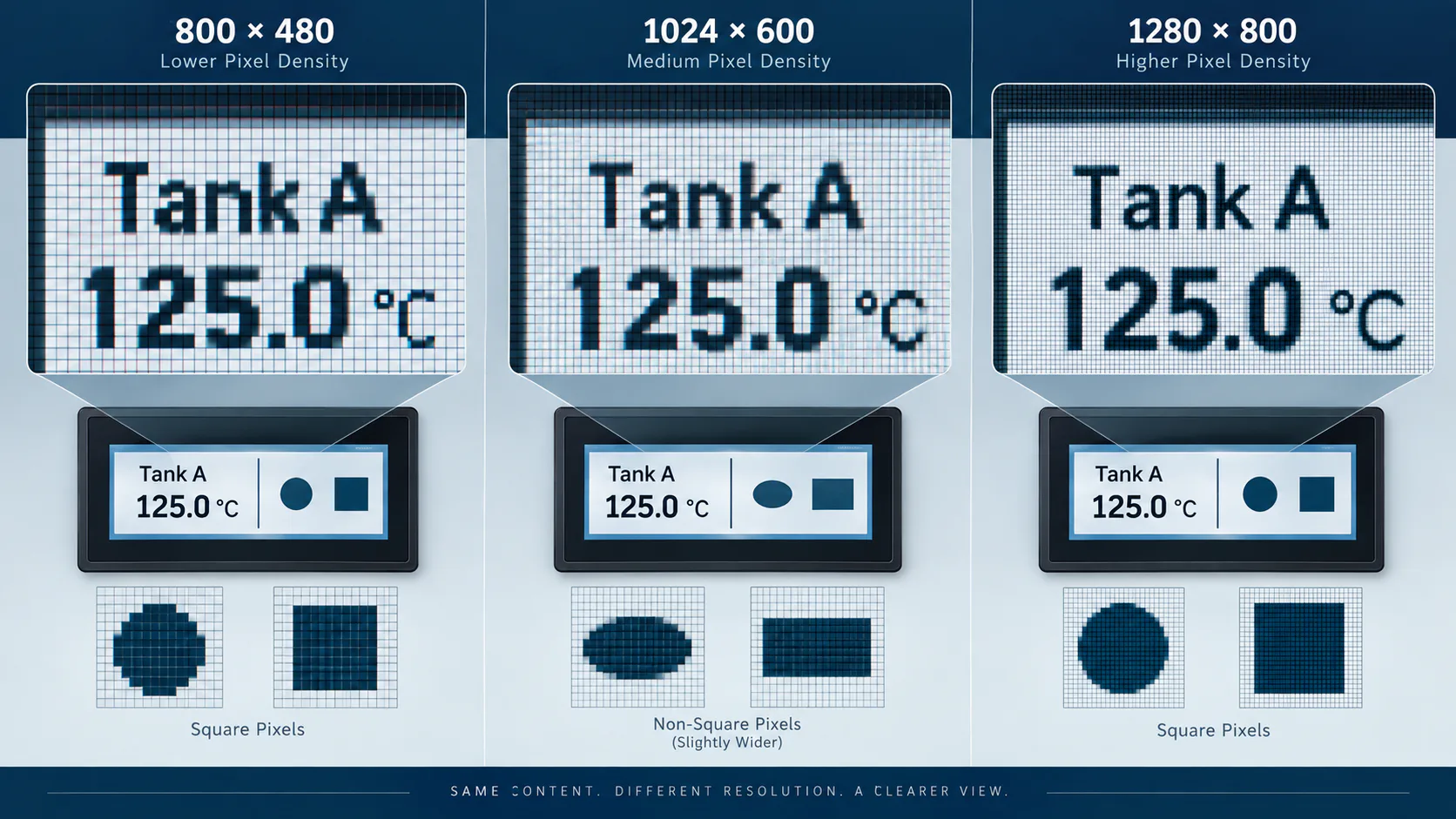
The 1024×600 row deserves a second look. Its published active area implies pixels about 5 % wider than they are tall. That is normal for this format and is invisible in text and most UI work, but it is not invisible everywhere: a circle drawn with equal pixel radii renders as a slight ellipse, and a square icon renders slightly wide. If your interface contains gauges, dials, round indicators or camera imagery where geometric fidelity matters, either apply the aspect correction in the UI layer or choose one of the square-pixel options. Teams discover this late, usually when a customer notices that a dial is not round.
Density also sets the smallest text you can render honestly. A 3 mm cap height — a reasonable minimum for a 500 mm viewing distance — is about 16 pixels tall at 0.1905 mm pitch, 21 at 0.1432 mm and 26 at 0.1170 mm. At 16 pixels you are limited to clean sans-serif glyphs with no fine detail; at 26 you can use a font with real weight variation and smaller secondary labels. This is the actual reason to move up in resolution, and it is worth checking against your own font and content before committing.
What the Host Has to Pay
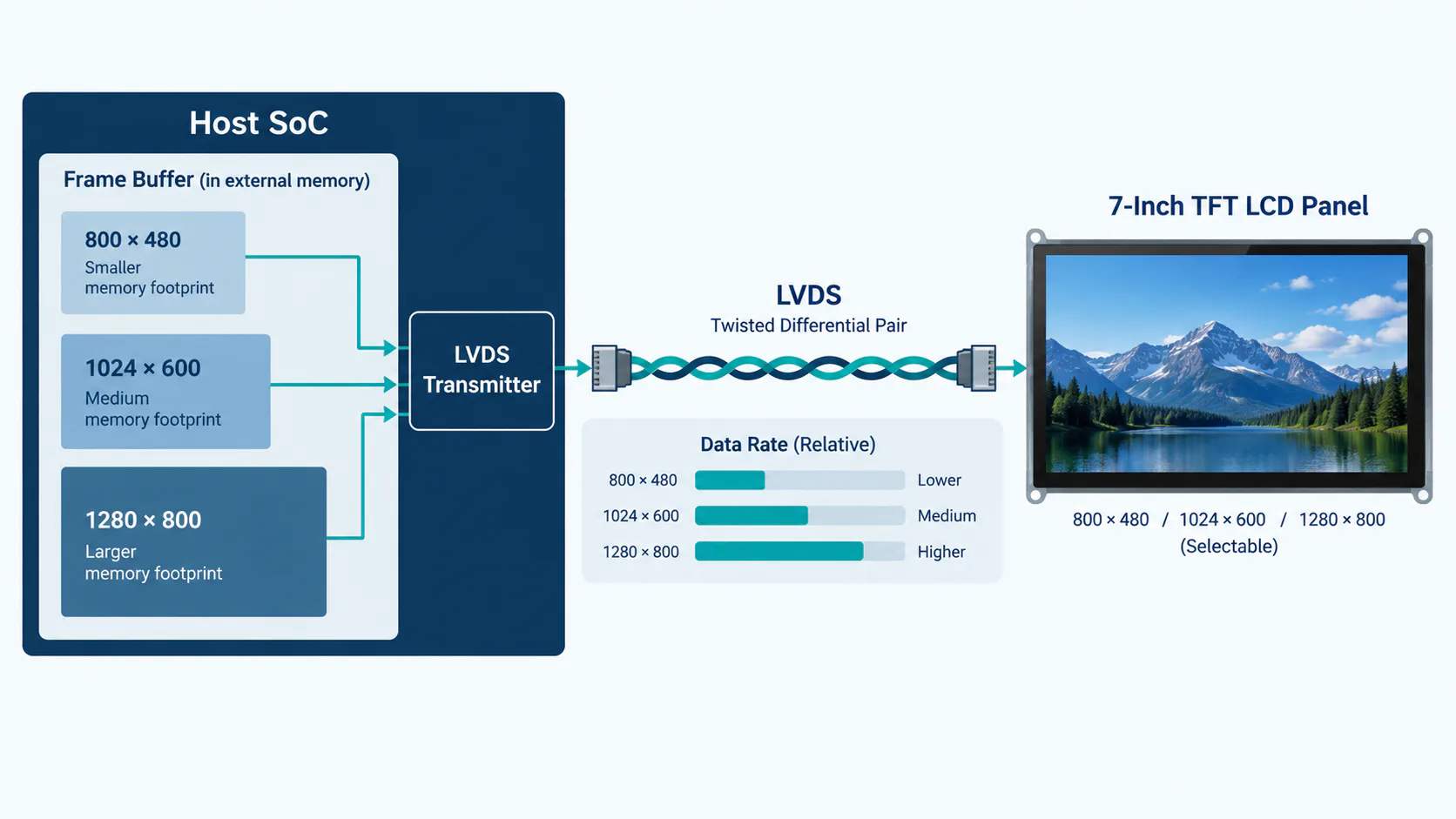
Resolution is a cost on the processor side, and the cost is not linear in anything intuitive — it scales with pixel count, and pixel count scales with the product of both axes.
| Resolution | Frame buffer, 24 bpp | Frame buffer, 16 bpp | Active pixel rate at 60 Hz | Relative load |
|---|---|---|---|---|
| 800×480 | 1.15 MB | 0.77 MB | 23.0 Mpixel/s | 1.00× |
| 1024×600 | 1.84 MB | 1.23 MB | 36.9 Mpixel/s | 1.60× |
| 1280×800 | 3.07 MB | 2.05 MB | 61.4 Mpixel/s | 2.67× |
Multiply the frame buffer by the number of buffers you actually use. A double-buffered 1280×800 UI at 24 bpp needs roughly 6 MB of contiguous display memory before any off-screen surfaces, compositing layers or graphics scratch space — which on a small MCU-class or low-end SoC platform is the difference between a design that works and a re-spin. The same arithmetic constrains refresh: if your framework redraws the whole screen for every animation, the 2.67× pixel-rate increase shows up directly as a slower, less responsive interface.
Where the extra pixels matter far less is on the wire. All three modules are LVDS, and a single-link LVDS channel handles a 7-inch 1280×800 panel at 60 Hz comfortably. The practical LVDS issues at this size are harness length, differential pair matching, connector choice and where the ground return goes — see the LVDS cable-length guide before freezing the harness.
One interface point is worth stating plainly because it surprises people moving up from smaller panels: none of these 7-inch modules is parallel RGB. A 4.3-inch or 5-inch design built around an RGB host interface does not scale to 7 inches by swapping the panel — you need an LVDS-capable host, a bridge IC or a controller board. The TFT LCD interface guide and the controller board selection guide cover the options.
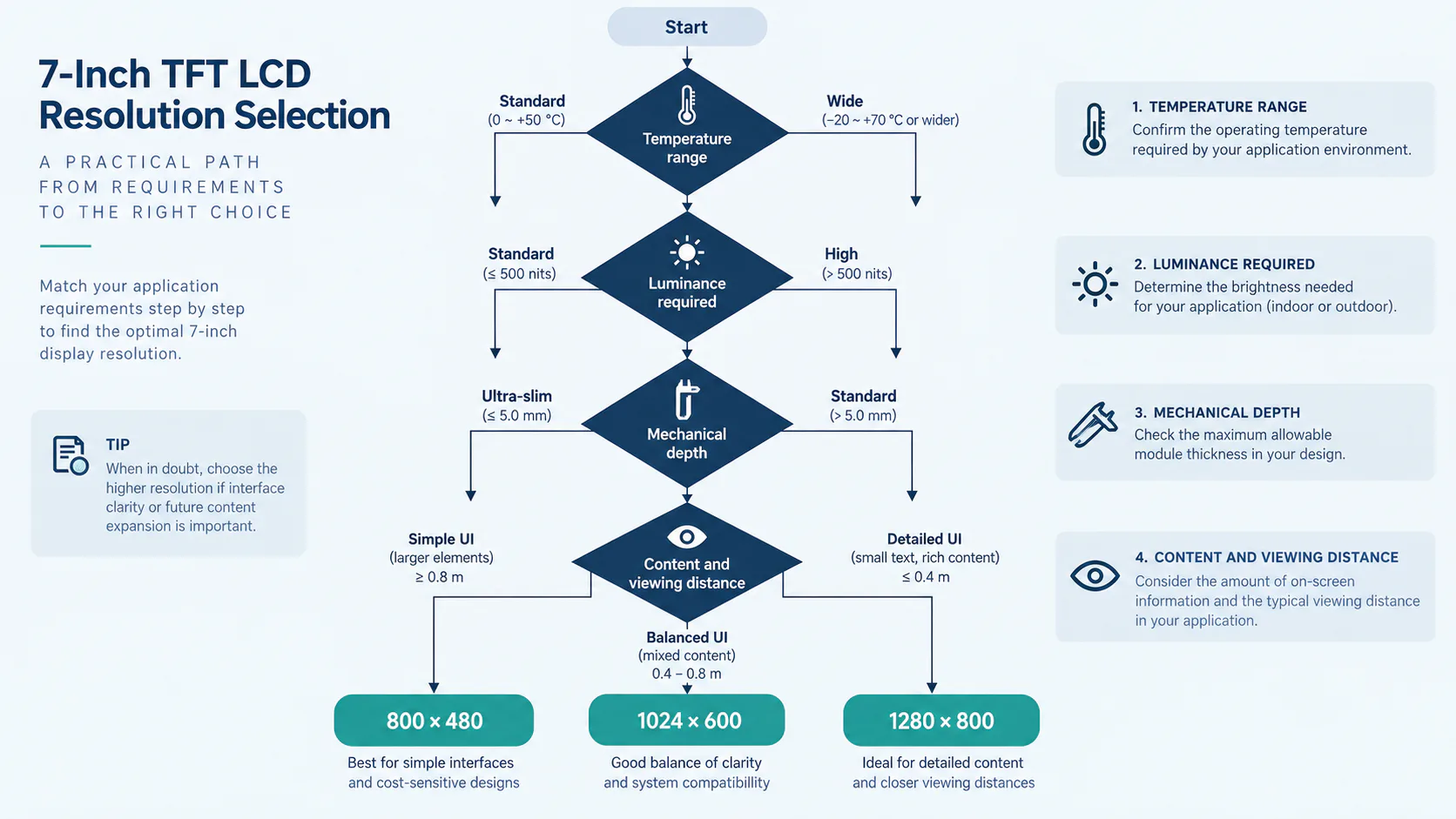
Selection Sequence
Run these in order. Each step either eliminates options or it does not; stopping to compare pixel counts before step 4 wastes time.
- Operating and storage temperature. Take the real enclosure-internal range, not the ambient. If it exceeds −20 to 70 °C, you are choosing DS-T070SWHWA-01 at 800×480 or moving to a customization discussion.
- Luminance and viewing environment. Direct sun, shaded outdoor, bright indoor or controlled indoor. If you need 1000 cd/m² through a cover lens, the 1280×800 option drops out. The 800 vs 1000 vs 1200 nits comparison helps set the target honestly.
- Mechanical envelope. Available opening, bezel overlap and maximum stack depth — remembering that the cover lens, touch panel and air gap or bonding layer all sit on top of the module depth in the table.
- Content and viewing distance. Now ask what the interface must render, in the smallest text you actually intend to use, at the real distance. Mock it up at pixel scale rather than reasoning about it.
- Host capability. Interface family, available display memory, GPU or 2D acceleration, and how your UI framework redraws.
- Touch and front stack. All three modules ship without a touch panel, so the PCAP sensor, cover lens and bonding are a separate specification — see the PCAP design guide.
- Lifecycle. Confirm availability and change-notification terms for the exact suffix before design lock.
- Sample and validate the chosen configuration against the checklist below.
Where Each One Fits
800×480 — DS-T070SWHWA-01
The choice for wide-temperature and outdoor work, and still the right choice for large-target, glove-operated interfaces. With 0.1905 mm square pixels and 1000 cd/m², it suits outdoor equipment, EV chargers and machine panels where the content is a handful of large values, a status band and a few buttons. Note the trade: the largest outline and the greatest depth of the three, plus a 20-pin LVDS connector rather than 40-pin.
1024×600 — DS-T070BAHA-02
The general-purpose industrial HMI and factory automation option: 1.6× the pixels of 800×480 for a modest host cost, still at 1000 cd/m², in a 5.65 mm module. The two things to keep in mind are the non-square pixel geometry and the −20 to 70 °C range, which is a standard industrial range rather than a wide one.
1280×800 — DS-T070TISA-01
For content that genuinely needs density: waveforms, multi-column tables, small-font annotation, test and measurement and medical equipment interfaces. Square 0.117 mm pixels, 16:10, and the thinnest module of the three at 3.35 mm — useful for handheld devices. It asks the most of the host and gives the least brightness, so it belongs in controlled or indoor lighting unless you are prepared to discuss a custom backlight.
Validation Checklist
Before production approval on a 7-inch design, confirm the following with the actual sample in the actual enclosure. The broader version of this list is the sample validation checklist.
- Timing lock. Confirm the LVDS mapping (6-bit vs 8-bit), the pin assignment for the specific 20-pin or 40-pin connector, and stable operation across the full clock and blanking range in the datasheet — not just at one working setting.
- Smallest-text legibility. Display the real UI with the real font at the real distance and lighting, with a reviewer who did not design it.
- Geometric check on 1024×600. Render a nominal circle and a nominal square and measure them on the glass; apply aspect correction if the interface contains round or geometric elements.
- Mechanical fit with the full stack. Module depth plus touch sensor, cover lens, gasket and bonding or air gap, against the enclosure — and check bezel overlap against the active area, which differs across the three.
- Thermal soak at the temperature limits, powered, in the enclosure, including cold start from the lowest specified temperature.
- Luminance through the finished front stack, measured rather than assumed — reflection and the cover lens both cost light.
- Host memory and redraw performance with all buffers allocated and the interface animating, not with a static test pattern.
- Harness verification at the production cable length and routing, with the backlight running at its real PWM setting.
If None of the Three Fits
The common gap is 1280×800 with high brightness, and the honest answer is that it is a customization request rather than a catalogue selection: a higher-output backlight, its thermal design, and the lifetime consequence of running it hot. The second common gap is a wide-temperature module above 800×480. In both cases the useful starting point is the environment and content brief rather than a part number — see the requirements checklist for what to send, and browse modules by size or the high-brightness range for adjacent sizes. Stepping down to 5 inches or up to 8.4 inches sometimes solves the problem more cheaply than customizing a 7-inch panel.
If you are working through a family of products, the sibling guides for 3.5 inch and 4.3 inch use the same method, and the trade-offs move in the same directions.
On the numbers in this article. Model specifications are taken from our published product data for DS-T070SWHWA-01, DS-T070BAHA-02 and DS-T070TISA-01 and must be confirmed against the current datasheet for the exact suffix before design-in. Pixel pitch, density, frame-buffer size and pixel rate are arithmetic derived from those published figures; pixel-clock figures assume typical 60 Hz blanking and are indicative only — use the datasheet timing. No certification, rating or customer deployment is claimed for any product mentioned.
FAQ: 7 Inch Resolution Selection
Is 1024×600 always better than 800×480 at 7 inches?
No. It gives 1.6× the pixels and finer text, but it also increases frame buffer, pixel rate and redraw cost, and in the current 7-inch line it has a narrower temperature range than the 800×480 wide-temperature part. For large-target buttons and status text read from half a metre, the extra pixels change nothing the operator can see.
What is the pixel pitch of each option?
Derived from the published active areas: 0.1905 mm square (≈133 ppi) at 800×480; 0.1506 × 0.1432 mm at 1024×600, so the pixels are not square and the two axes differ by about 5 %; and 0.1170 mm square (≈217 ppi) at 1280×800.
Can I get 1280×800 at 1000 nits in 7 inch?
Not from the current catalogue — the 1280×800 module is 400 cd/m² while the two lower-resolution parts are 1000 cd/m². A denser pixel grid has lower aperture ratio, so matching the luminance needs a stronger backlight and more heat. It becomes a customization question with a thermal and lifetime discussion attached.
Do these 7-inch modules take a parallel RGB interface?
No. All three are LVDS — 6/8-bit 20-pin, 6/8-bit 40-pin and 8-bit 40-pin respectively. An RGB-based design moving up from 4.3 or 5 inches needs an LVDS-capable host, a bridge IC or a controller board.
Which resolution suits a wide-temperature outdoor HMI?
Start from temperature. Only DS-T070SWHWA-01 is specified −30 to 85 °C operating; the others are −20 to 70 °C. If the equipment must start cold, that module is the one that qualifies and the interface is designed within 800×480.